Navidrome-MCP
by Blakeem·★ 68·Score 46
MCP server for controlling Navidrome music library with conversation-based playback, discovery tools, and web remote control.
Overview
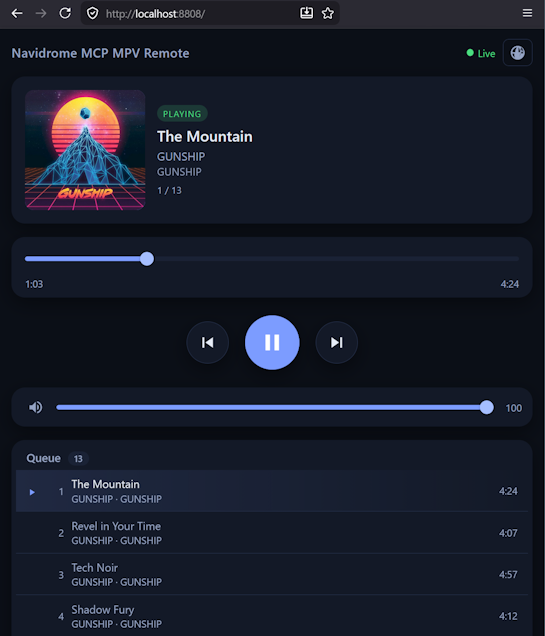
Navidrome-MCP transforms your Navidrome music server into a conversational music assistant. It allows browsing and searching your library, building playlists, discovering new music through Last.fm, fetching synced lyrics, and streaming audio directly through your speakers using mpv. The server includes a built-in web UI that lets any device with a browser act as a remote control. It integrates fully with Navidrome, maintaining play counts and recently-played data synchronization across devices and platforms.
Try asking AI
After installing, here are 5 things you can ask your AI assistant:
When to choose this
Choose Navidrome-MCP if you use Navidrome as your music server and want conversational control over your music library with advanced playback features and music discovery.
When NOT to choose this
Don't choose this if you don't use Navidrome or prefer a web-based music management interface without local audio playback capabilities.
Tools this server exposes
9 tools extracted from the READMEbrowse_songsBrowse and search songs with rich filtering options
play_audioPlay songs through local speakers using mpv
create_playlistCreate and manage playlists with various content options
discover_musicFind similar artists and tracks via Last.fm
fetch_lyricsFetch time-synced lyrics from LRCLIB database
manage_radioManage Navidrome radio stations and discover new ones
listening_analyticsAccess play counts, recently-played activity, and top-rated listings
manage_ratingsStar/unstar items and set 0-5 star ratings
manage_librarySwitch between different Navidrome libraries
Comparable tools
Installation
Installation
Prerequisites
- Node.js 20+
- A running Navidrome server
- An MCP-compatible client (Claude Desktop, Claude Code, Cursor, etc.)
- Optional: mpv for local audio playback
Quick Setup
npm install -g navidrome-mcpConfigure Claude Desktop
Edit claude_desktop_config.json:
{
  "mcpServers": {
    "navidrome": {
      "command": "npx",
      "args": ["navidrome-mcp"],
      "env": {
        "NAVIDROME_URL": "http://your-server:4533",
        "NAVIDROME_USERNAME": "your_username",
        "NAVIDROME_PASSWORD": "your_password",
        "LASTFM_API_KEY": "your_api_key",
        "RADIO_BROWSER_USER_AGENT": "Navidrome-MCP/2.0 (+https://github.com/Blakeem/Navidrome-MCP)",
        "LYRICS_PROVIDER": "lrclib",
        "LRCLIB_USER_AGENT": "Navidrome-MCP/2.0 (+https://github.com/Blakeem/Navidrome-MCP)"
      }
    }
  }
}
FAQ
- Can I control playback without installing mpv?
- Yes, you can still browse and manage your library, build playlists, and control Navidrome's queue without mpv. mpv is only required for local audio playback through your speakers.
- Which MCP clients are compatible with Navidrome-MCP?
- It's compatible with Claude Desktop, Claude Code, Cursor, and any other MCP client with local stdio support. Note: ChatGPT Desktop currently requires a hosted HTTPS endpoint, so it's not directly compatible.
Compare Navidrome-MCP with
Last updated · Auto-generated from public README + GitHub signals.