snippy
by Azure-Samples·★ 110·Score 46
Azure Functions-based MCP server with vector search and multi-agent workflows for AI-powered code snippet management.
Overview
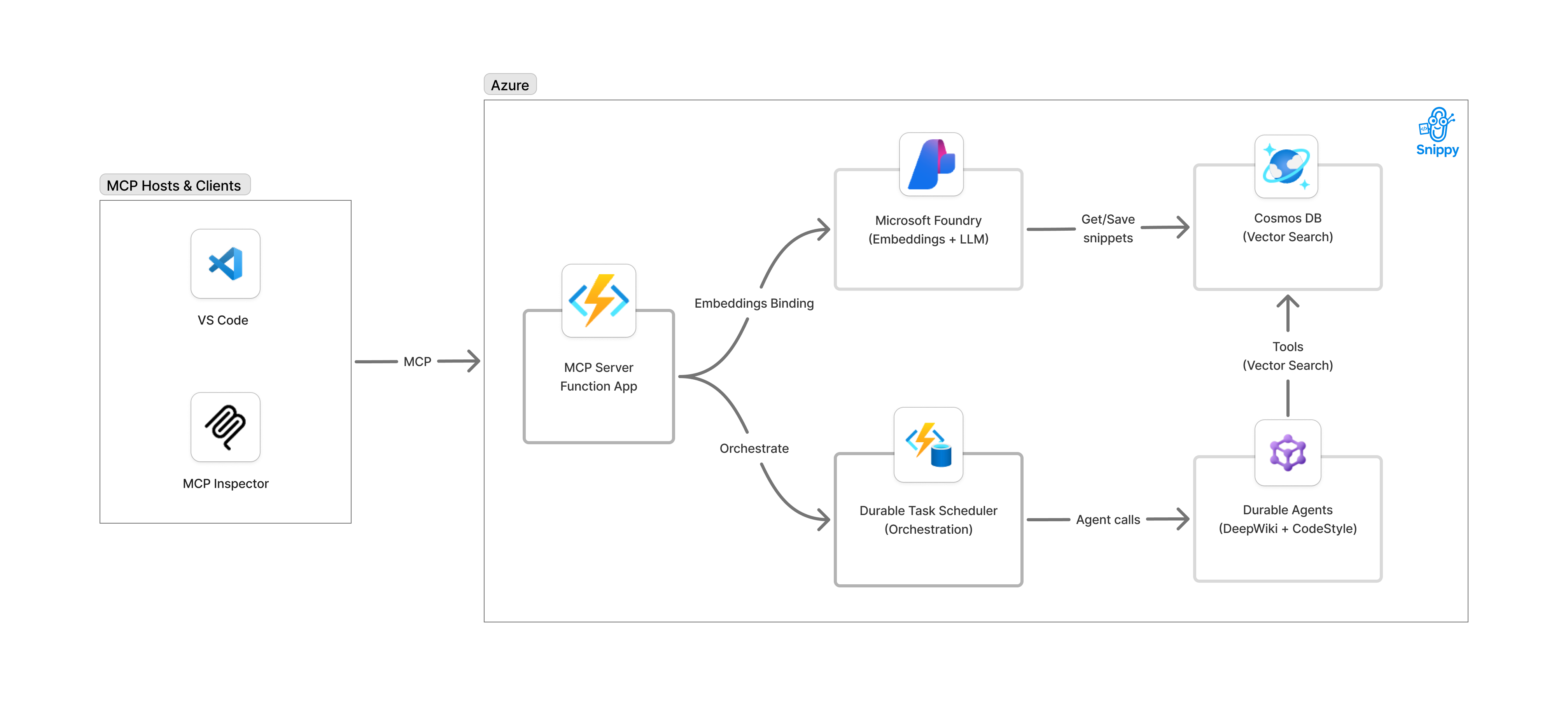
Snippy is a comprehensive MCP server built on Azure Functions that demonstrates how to create AI-powered tools for code snippet management. It integrates Azure OpenAI for embeddings, Cosmos DB with vector indexing for semantic search, and Durable Functions for multi-agent orchestration. The server exposes multiple MCP tools including save_snippet, get_snippet, code_style, and deep_wiki, enabling AI assistants like GitHub Copilot to interact with a sophisticated code management system.
Try asking AI
After installing, here are 5 things you can ask your AI assistant:
When to choose this
Choose Snippy if you're building MCP tools on Azure and need a reference implementation that demonstrates multi-agent orchestration and vector search for code-related applications.
When NOT to choose this
Avoid Snippy if you need a vendor-neutral solution, are not using Azure services, or require extensive customization beyond the provided multi-agent workflow pattern.
Tools this server exposes
5 tools extracted from the READMEsave_snippetSave code snippets with vector embeddings for semantic search
get_snippetRetrieve previously saved code snippets by their unique name
code_styleGenerate language-specific code style guides from saved snippets
deep_wikiCreate comprehensive wiki documentation by analyzing code snippets
generate_comprehensive_documentationOrchestrate multi-agent workflow to produce deep wiki and style guide
Comparable tools
Installation
Installation
**Prerequisites:**
- Azure subscription
- azd CLI installed
- Choose development environment: GitHub Codespaces, VS Code Dev Containers, or local
**To deploy:**
azd init --template Azure-Samples/snippy
azd auth login
azd up
**For Claude Desktop:** Add to Claude Desktop config:
{
  "mcpServers": {
    "snippy": {
      "command": "python",
      "args": ["-m", "snippy.mcp"]
    }
  }
}
FAQ
- What is the primary purpose of Snippy?
- Snippy is an MCP server that exposes Azure Functions as tools for AI assistants to manage code snippets with semantic search and generate documentation.
- Can Snippy be deployed on-premises?
- Snippy is designed for Azure deployment but can be developed locally using Docker emulators before deploying to Azure.
Compare snippy with
Last updated · Auto-generated from public README + GitHub signals.