Fusion-360-MCP-Server
by AuraFriday·★ 94·Score 47
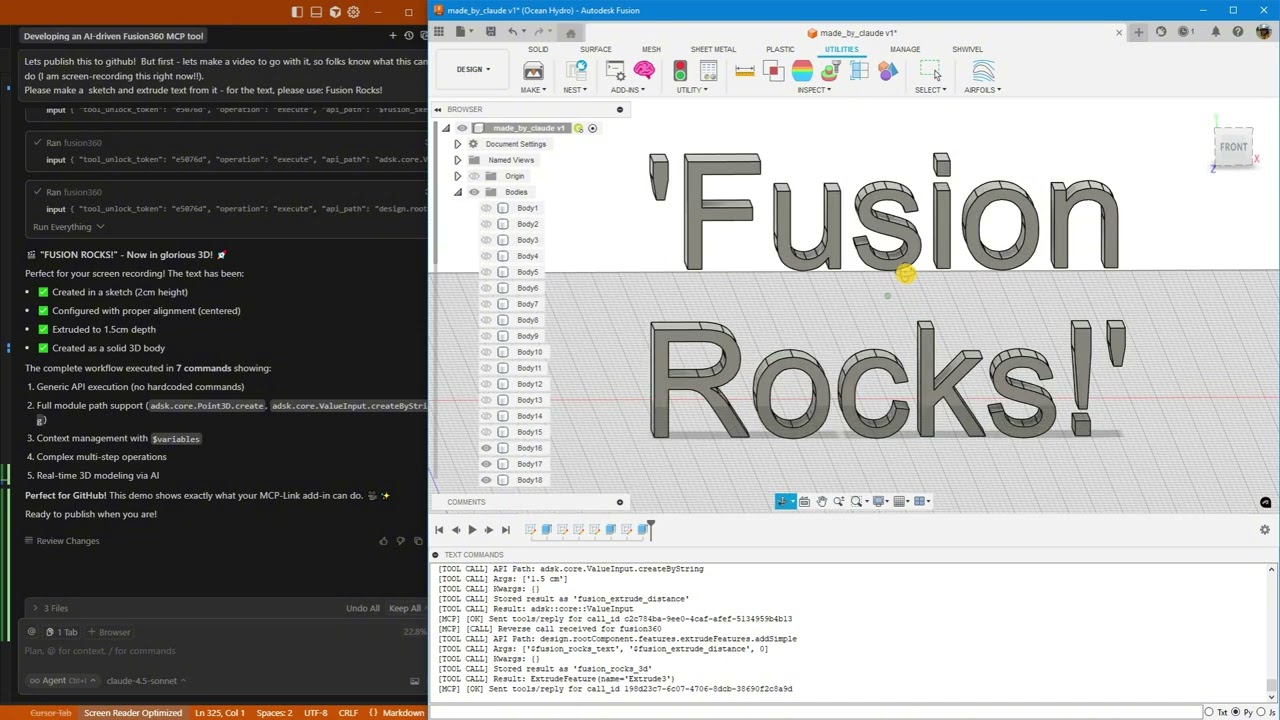
A fully functional MCP server that enables AI agents to control Autodesk Fusion 360 through Python execution, generic API calls, and cross-tool integration.
Overview
This is a mature, production-ready MCP server that connects Autodesk Fusion 360 with AI systems through an MCP-Link server. It provides three primary methods for AI interaction: generic API calls for simple operations, Python execution for complex workflows, and MCP tool integration for cross-application functionality. The server features thread-safe architecture, centralized logging, auto-updates, and rich documentation with three complementary sources. Recent additions include Python execution with full Fusion API access and enhanced documentation systems.
Try asking AI
After installing, here are 6 things you can ask your AI assistant:
When to choose this
Choose this when you need AI to control CAD design processes in Fusion 360 with full API access, especially for parametric modeling and mechanical design workflows.
When NOT to choose this
Don't choose this if you're not using Autodesk Fusion 360, as it's specifically designed for this CAD platform and requires it to function.
Tools this server exposes
12 tools extracted from the READMEfusion360.executeExecute Fusion API commands, Python code, or MCP tool calls
BrowserAutomate Chrome browser to read, click, type, navigate, and extract data
SQLiteDatabase operations with semantic search and embeddings
PythonExecute Python code locally with full MCP tool access
OpenRouterAccess 500+ AI models (free and paid) for design assistance
HuggingFaceRun AI models offline without internet connection
Context7Pull live documentation for any library
DesktopControl Windows applications (click, type, read)
UserShow HTML popups for forms, confirmations, and results
RemoteLet external systems offer tools (like Fusion)
ConnectorAdd any third-party MCP tools
get_api_documentationGet Fusion API documentation through introspection
Comparable tools
Installation
Installation
Prerequisites
- **Download MCP-Link Server**
Get the latest release: https://github.com/AuraFriday/mcp-link-server/releases/tag/latest
- **Install the Fusion Add-In**
Official link: https://apps.autodesk.com/FUSION/en/Detail/Index?id=7269770001970905100
Manual Installation (Optional)
- Clone the repository:
``bash git clone https://github.com/AuraFriday/Fusion-360-MCP-Server.git ``
- Load as Fusion Add-In:
- Open Fusion - Press Shift+S to open Scripts and Add-Ins - Click the **Add-Ins** tab - Click the green **+** button next to "My Add-Ins" - Navigate to the cloned repository folder - Select the folder and click **OK** - Click **Run** to start the add-in
The add-in auto-connects to the MCP server on startup. Check the **TEXT COMMANDS** window in Fusion to see connection logs.
FAQ
- What is MCP-Link?
- MCP-Link is the middleware server that bridges the Fusion 360 add-in with AI systems, handling communication between the MCP protocol and Fusion's API.
- Can I use this with Claude Desktop?
- Yes, you can configure Claude Desktop to connect to the MCP-Link server which in turn connects to Fusion 360 through this MCP server.
- What authentication is required?
- No authentication is needed for the Fusion add-in itself, but the MCP-Link server may require configuration depending on your AI platform setup.
Compare Fusion-360-MCP-Server with
Last updated · Auto-generated from public README + GitHub signals.