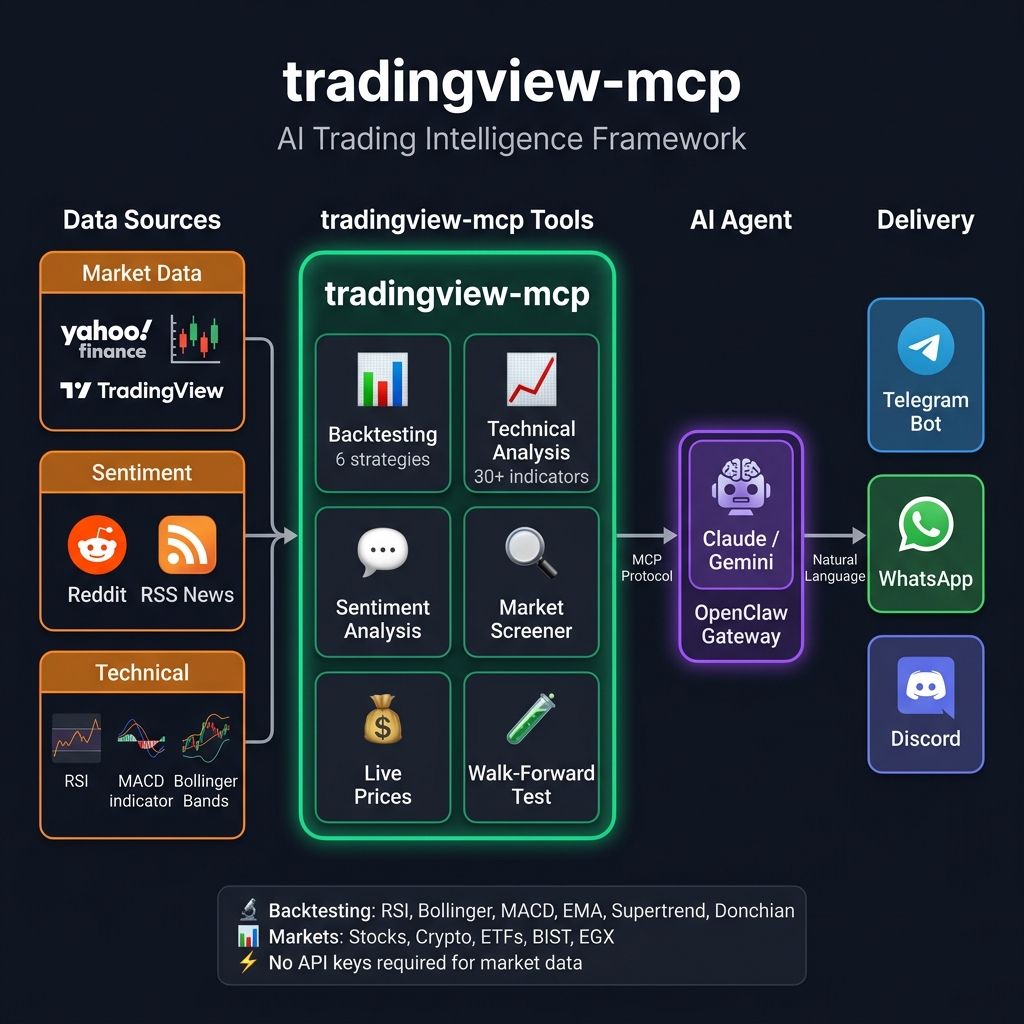
tradingview-mcp
by atilaahmettaner·★ 2,698·Score 57
AI trading MCP server with real-time stock/crypto screening, technical analysis, and native Claude integration.
Overview
TradingView-MCP is a comprehensive AI-powered trading toolkit that integrates with Claude Desktop via the MCP protocol. It provides real-time market data, technical analysis indicators, backtesting capabilities, and sentiment analysis across multiple exchanges. The server features specialized AI agents for technical analysis, sentiment analysis, and risk management, producing actionable trading recommendations with confidence scores. It supports both self-hosting and a premium hosted option for users who prefer not to handle the technical setup.
Try asking AI
After installing, here are 5 things you can ask your AI assistant:
When to choose this
Choose this MCP server if you need AI-powered trading tools with backtesting capabilities and technical analysis for multiple asset classes, especially if you want to avoid the complexity of setting up multiple data sources and API keys.
When NOT to choose this
Avoid this if you need real-time trading execution, require futures/options trading features, or prefer a cloud-based solution rather than self-hosting.
Tools this server exposes
12 tools extracted from the READMEbacktest_strategyBacktest 1 of 6 trading strategies with institutional metrics
compare_strategiesRun all 6 strategies on same symbol and rank by performance
yahoo_priceGet real-time quote with price, change%, 52w high/low, market state
market_snapshotGlobal market overview with indices, crypto, and forex
market_sentimentAnalyze Reddit sentiment across finance communities
financial_newsGet live RSS headlines from Reuters, CoinDesk, CoinTelegraph
combined_analysisConfluence analysis combining technicals, sentiment, and news
get_technical_analysisFull technical analysis with 23 indicators and BUY/SELL/HOLD
get_bollinger_band_analysisProprietary Bollinger Bands analysis with ±3 rating system
get_stock_decision3-layer decision engine with ranking, trade setup, and quality score
screen_stocksMulti-exchange screener with 20+ filter criteria
get_candlestick_patternsDetect 15 different candlestick patterns
Comparable tools
Installation
Install via pip:
pip install tradingview-mcp-serverClaude Desktop Config (claude_desktop_config.json):
{
  "mcpServers": {
    "tradingview": {
      "command": "/Users/YOUR_USERNAME/.local/bin/uvx",
      "args": ["--from", "tradingview-mcp-server", "tradingview-mcp"]
    }
  }
}
On Linux, replace /Users/YOUR_USERNAME with /home/YOUR_USERNAME. On Windows, use %USERPROFILE%\.local\bin\uvx.exe.
FAQ
- Does this require API keys for financial data providers?
- No, the tradingview-mcp server does not require API keys as it sources data from public market feeds.
- Which trading strategies are supported for backtesting?
- The server supports 6 strategies: RSI mean reversion, Bollinger Bands mean reversion, MACD golden/death cross, EMA cross, Supertrend trend following, and Donchian Channel breakout.
Compare tradingview-mcp with
Last updated · Auto-generated from public README + GitHub signals.