dbt-doctor
by Astoriel·★ 134·Score 48
AI-driven quality & governance MCP server for dbt projects, offering auditing, profiling, drift detection, and documentation generation.
Overview
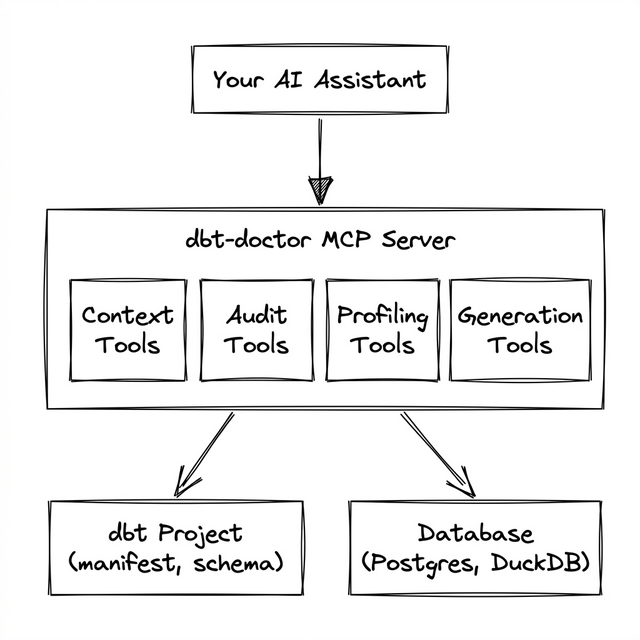
dbt-doctor is a specialized MCP server designed to enhance dbt project management through AI-assisted quality control and governance. It provides deep context about dbt project health, allowing users to interact with AI assistants for tasks like auditing coverage, profiling data models, detecting schema drift, and auto-generating documentation. The server operates as a complement to the official dbt-labs/dbt-mcp, focusing on analytics rather than command execution. The server's architecture consists of a read-only analysis layer that connects the AI assistant with dbt projects and data warehouses, combined with a secure generation toolkit that seamlessly merges changes into existing YAML schemas. It emphasizes security through read-only SQL execution, strict SQL validation, stateless connections, and preview-before-commit mechanisms for document generation, ensuring users maintain full control over their dbt configurations.
Try asking AI
After installing, here are 3 things you can ask your AI assistant:
When to choose this
Choose this when you want AI-powered dbt project health auditing, data profiling, and auto-documentation without leaving your AI assistant interface.
When NOT to choose this
Don't choose this if you need direct write access to your database or if you prefer traditional CLI-based dbt workflow without AI integration.
Tools this server exposes
12 tools extracted from the READMElist_modelsOverview of all models and their coverage status
get_model_detailsDetailed model information including SQL, columns, lineage, and tests
audit_projectProject health score and naming convention violations
check_test_coverageModels ranked by their test coverage percentage
analyze_dagDetection of orphan models and high fan-out nodes
get_project_healthSingle-call dashboard summarizing project status
profile_modelBatched column statistics for a model
execute_queryRead-only SQL execution against your warehouse
detect_schema_driftComparison of database columns against manifest definitions
suggest_testsTranslation of profile data into dbt test recommendations
update_model_yamlSafe merging of documentation and tests to schema.yml
generate_model_docsComplete end-to-end documentation workflow
Comparable tools
Installation
Install dbt-doctor via pip:
pip install dbt-doctorFor Claude Desktop, add to your claude_desktop_config.json:
{
  "mcpServers": {
    "dbt-doctor": {
      "command": "dbt-doctor",
      "args": ["--project-dir", "/absolute/path/to/your/dbt/project"]
    }
  }
}
For Cursor, add to your .cursor/mcp.json:
{
  "mcpServers": {
    "dbt-doctor": {
      "command": "dbt-doctor",
      "args": ["--project-dir", "/absolute/path/to/your/dbt/project"]
    }
  }
}
Prerequisite: Run dbt compile prior to usage to ensure target/manifest.json is available.
Compare dbt-doctor with
Last updated · Auto-generated from public README + GitHub signals.