adk-python-mcp-client
by arjunprabhulal·★ 34·Score 38
Python implementation of ADK as an MCP client for flight search with Gemini 2 LLM.
Overview
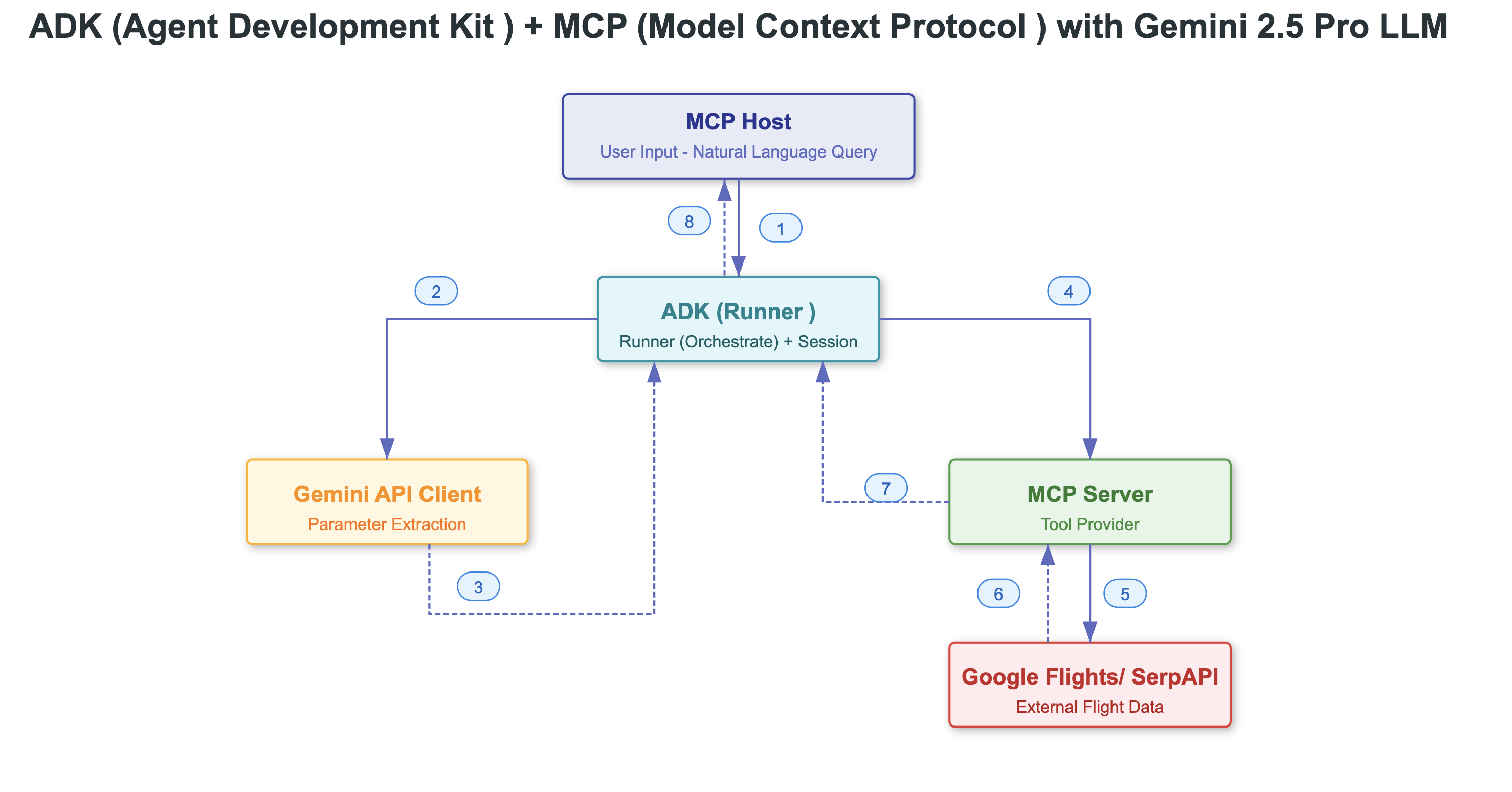
This project demonstrates how to use the Agent Development Kit (ADK) as an MCP client for flight search capabilities. It showcases asynchronous integration between ADK's LlmAgent and an external MCP server, featuring dynamic tool discovery, stateful session management, and structured function calling. The implementation uses Google's Gemini model as the LLM and connects to an MCP server that provides flight search capabilities via SerpAPI.
Try asking AI
After installing, here are 5 things you can ask your AI assistant:
When to choose this
Choose this implementation for learning how to build MCP clients with Google's ADK, particularly for those already using Google Cloud services and Gemini models.
When NOT to choose this
Not ideal for production systems requiring vendor diversity or those not using Google's ecosystem, as it ties the implementation to Google-specific technologies.
Tools this server exposes
1 tool extracted from the READMEflight_searchflight_search(origin, destination, date)Searches for flights from an origin to destination on a specific date using real-time flight data.
Note: The tool 'flight_search' is clearly documented as the only MCP tool exposed by the mcp-flight-search server. The README specifically mentions connecting to this server to enable Gemini to interact with real-world APIs for flight search func
Comparable tools
Installation
Installation
- Clone the repository:
git clone https://github.com/arjunprabhulal/adk-python-mcp-client.git
cd adk-python-mcp-client- Set up environment:
python -m venv venv
source venv/bin/activate  # On Windows: venv\Scripts\activate
pip install -r requirements.txt- Configure environment variables:
cp .env.example .env
# Edit .env with your API keys- Run the client:
python client.pyClaude Desktop configuration (if applicable):
{
  "mcpServers": {
    "adk-python-mcp": {
      "command": "python",
      "args": ["path/to/client.py"]
    }
  }
}
FAQ
- What is ADK in this context?
- ADK stands for Agent Development Kit, which is used in this project as an MCP client to connect to an MCP server and provide flight search capabilities through Gemini 2.
- What MCP server does this client connect to?
- This client connects to 'mcp-flight-search', an MCP server built using FastMCP that exposes flight search tools via SerpAPI.
Compare adk-python-mcp-client with
Last updated · Auto-generated from public README + GitHub signals.