photoshop-mcp
by alisaitteke·★ 44·Score 45
Photoshop MCP server enables AI assistants to control Adobe Photoshop with 50+ tools for design automation.
Overview
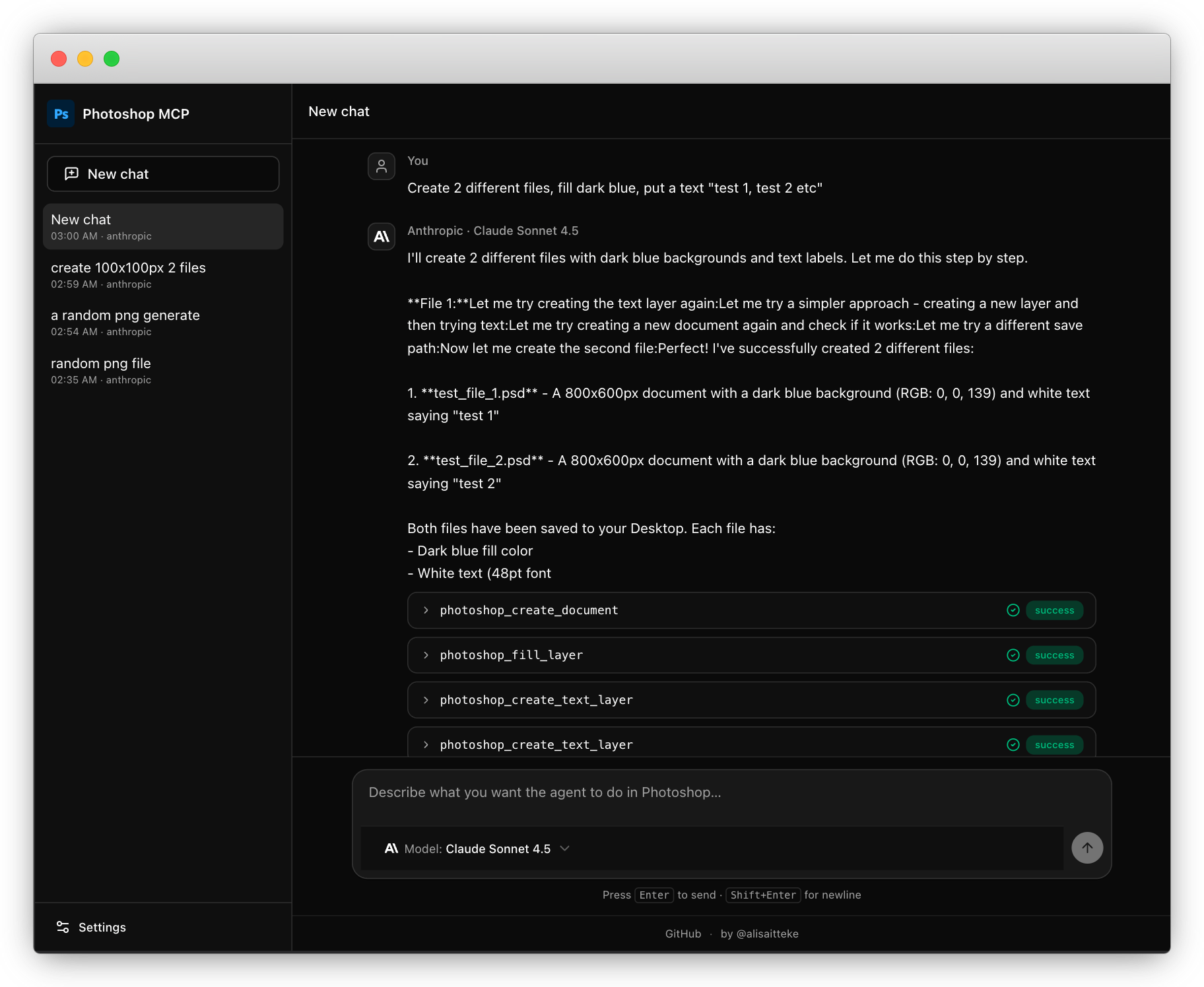
The Photoshop MCP server provides comprehensive automation capabilities for Adobe Photoshop through the Model Context Protocol. It allows AI assistants like Claude and Cursor to programmatically control Photoshop, enabling natural language commands for design, image editing, and workflow automation. The server supports both Windows and macOS platforms and works with Photoshop versions from 2012 to 2025+. It features a standalone UI that requires no IDE, allowing users to chat with AI models while driving Photoshop through this MCP server.
Try asking AI
After installing, here are 7 things you can ask your AI assistant:
When to choose this
Choose this when you need AI-assisted Photoshop automation and are already using or planning to use Claude or Cursor with MCP support.
When NOT to choose this
Don't choose this if you're not an Adobe Photoshop user, or if you need a different image editing software like GIMP or Affinity Photo.
Tools this server exposes
12 tools extracted from the READMEphotoshop_pingTest connection to Photoshop.
photoshop_create_documentCreate a new Photoshop document.
photoshop_save_documentSave the active document to a specified path.
photoshop_create_layerCreate a new layer in the document.
photoshop_create_text_layerCreate a text layer with specified content and formatting.
photoshop_fill_layerFill the active layer with a solid color.
photoshop_set_layer_opacitySet the opacity of the active layer.
photoshop_set_layer_blend_modeSet the blend mode of the active layer.
photoshop_get_layersGet list of all layers in the active document.
photoshop_delete_layerDelete the active layer.
photoshop_close_documentClose the active document.
photoshop_set_layer_visibilityShow or hide the active layer.
Comparable tools
Installation
Using NPX (Recommended)
No installation required! Just configure your MCP client:
npx @alisaitteke/photoshop-mcpFrom Source
git clone https://github.com/alisaitteke/photoshop-mcp.git
cd photoshop-mcp
npm install
npm run build
Configuration for Claude Desktop
Add to your Claude Desktop config (~/Library/Application Support/Claude/claude_desktop_config.json on macOS or %APPDATA%\Claude\claude_desktop_config.json on Windows):
{
  "mcpServers": {
    "photoshop": {
      "command": "npx",
      "args": ["-y", "@alisaitteke/photoshop-mcp"],
      "env": {
        "LOG_LEVEL": "1"
      }
    }
  }
}
FAQ
- What Photoshop versions are supported?
- The server supports Photoshop versions from 2012 to 2025+ on both Windows and macOS platforms.
- Is this project affiliated with Adobe?
- No, this is an unofficial, community-maintained project and is not affiliated with or endorsed by Adobe Inc.
- Can I use this with AI models other than Claude?
- Yes, the standalone UI supports multiple providers including Anthropic, OpenAI, Google, and OpenRouter with various models.
Compare photoshop-mcp with
Last updated · Auto-generated from public README + GitHub signals.