owl-mcp
by ai4curation·★ 15·Score 39
OWL-MCP enables AI assistants to interact with OWL ontologies via standardized MCP protocol.
Overview
OWL-MCP is a Model-Context-Protocol server that bridges AI systems with Web Ontology Language (OWL) ontologies. It provides a thread-safe interface for performing CRUD operations on OWL files, supporting formats compatible with py-horned-owl. The server maintains an in-memory model synchronized with disk files, enabling real-time updates. It's particularly well-suited for OBO-style ontologies, providing human-readable labels for entities with standard annotation properties.
Try asking AI
After installing, here are 5 things you can ask your AI assistant:
When to choose this
Researchers and knowledge engineers working with OWL ontologies who want AI assistance for creating, modifying, and maintaining ontologies.
When NOT to choose this
If you need advanced ontology visualization features or support for other knowledge representation formats besides OWL.
Tools this server exposes
12 tools extracted from the READMEadd_axiomAdd an OWL axiom to an ontology file
remove_axiomRemove an OWL axiom from an ontology file
find_axiomsFind OWL axioms in an ontology file matching certain criteria
create_ontologyCreate a new OWL ontology file
list_ontologiesList available ontologies in the workspace
get_entity_labelsGet human-readable labels for ontology entities
sync_with_diskForce synchronization between in-memory model and disk file
add_observerRegister an observer for ontology change notifications
remove_observerRemove an observer from ontology change notifications
export_ontologyExport an ontology to a different format
validate_ontologyValidate an ontology for consistency
get_configurationRetrieve stored configuration for ontologies
Note: Tool names and functionality were extracted from the description section that mentions 'The MCP server provides function calls for finding, adding, or removing OWL axioms' and from the features listed in the README. These tools represent th
Comparable tools
Installation
Installation
- Install Goose (Desktop or CLI version) from [goose installation](https://block.github.io/goose/docs/getting-started/installation/)
- Set up an LLM provider (Anthropic recommended)
- Install OWL-MCP extension in Goose:
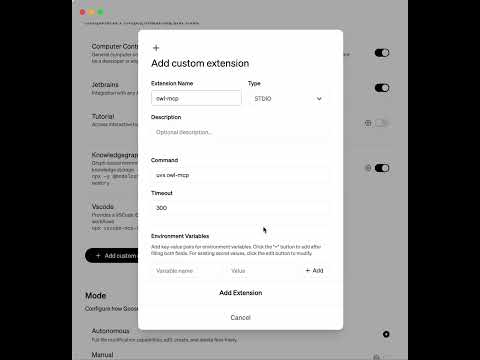
- Direct install: [Install OWL-MCP](goose://extension?cmd=uvx&arg=owl-mcp&id=owl_mcp&name=OWL%20MCP) - Manual: Add uvx owl-mcp to the Extension section of Goose
- Start using the extension to create and manage OWL ontologies
Claude Desktop Configuration
{
  "mcpServers": {
    "owl-mcp": {
      "command": "uvx",
      "args": ["owl-mcp"]
    }
  }
}
FAQ
- What OWL formats does OWL-MCP support?
- OWL-MCP accepts any format supported by py-horned-owl. It follows OBO guidelines and recommends functional syntax for source files.
- How does OWL-MCP synchronize with other tools like Protege?
- The server keeps an in-memory model synchronized with disk files. When changes are made, they're written to disk. If you have Protege running with the same file open, Protege will automatically detect and display these updates.
Compare owl-mcp with
Last updated · Auto-generated from public README + GitHub signals.