aws-cost-explorer-mcp-server
by aarora79·★ 127·Score 41
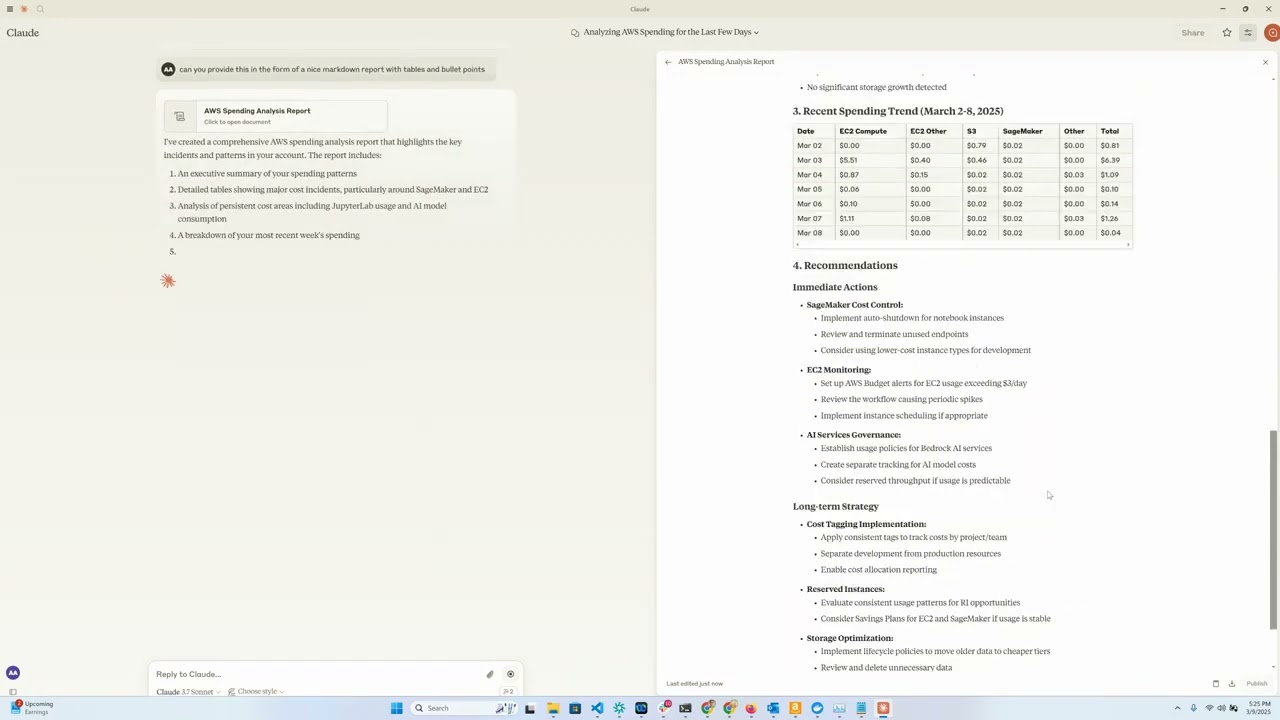
An MCP server that provides AWS Cost Explorer and Bedrock usage data analysis through Claude Desktop or LangGraph agents.
Overview
This MCP server enables users to query and analyze AWS spending data through natural language interfaces. It connects to AWS Cost Explorer API and CloudWatch Logs for Bedrock model invocation data. The server supports both local (stdio) and remote (SSE) deployments, with detailed configuration instructions for Claude Desktop integration and an optional Chainlit web interface. It also provides functionality for accessing cross-account AWS spending data when properly configured.
Try asking AI
After installing, here are 5 things you can ask your AI assistant:
When to choose this
Choose this MCP server if you need to analyze AWS cloud spending through natural language queries and are already using Claude Desktop.
When NOT to choose this
Avoid this if you need cost analysis for non-AWS cloud providers or require real-time cost monitoring capabilities beyond what AWS Cost Explorer provides.
Tools this server exposes
4 tools extracted from the READMEget_ec2_spend_last_dayget_ec2_spend_last_day()Retrieves EC2 spending data for the previous day
get_detailed_breakdown_by_dayget_detailed_breakdown_by_day(days=7)Delivers a comprehensive analysis of costs by region, service, and instance type
get_bedrock_daily_usage_statsget_bedrock_daily_usage_stats(days=7, region='us-east-1', log_group_name='BedrockModelInvocationLogGroup')Delivers a per-day breakdown of model usage by region and users
get_bedrock_hourly_usage_statsget_bedrock_hourly_usage_stats(days=7, region='us-east-1', log_group_name='BedrockModelInvocationLogGroup')Delivers a per-day per-hour breakdown of model usage by region and users
Comparable tools
Installation
Installation
- Install
uv:
# On macOS and Linux
curl -LsSf https://astral.sh/uv/install.sh | sh

# On Windows
powershell -ExecutionPolicy ByPass -c "irm https://astral.sh/uv/install.ps1 | iex"- Clone and setup the repository:
git clone https://github.com/aarora79/aws-cost-explorer-mcp.git
cd aws-cost-explorer-mcp
uv venv --python 3.12 && source .venv/bin/activate && uv pip install --requirement pyproject.toml- Configure AWS credentials in
~/.aws/credentials
Claude Desktop Configuration
{
  "mcpServers": {
    "aws-cost-explorer": {
      "command": "uv",
      "args": [
          "--directory",
          "/path/to/aws-cost-explorer-mcp",
          "run",
          "server.py"
      ],
      "env": {
        "AWS_ACCESS_KEY_ID": "YOUR_ACCESS_KEY_ID",
        "AWS_SECRET_ACCESS_KEY": "YOUR_SECRET_ACCESS_KEY",
        "AWS_REGION": "us-east-1",
        "BEDROCK_LOG_GROUP_NAME": "YOUR_CLOUDWATCH_BEDROCK_LOG_GROUP_NAME",
        "MCP_TRANSPORT": "stdio"
      }
    }
  }
}
FAQ
- Can this MCP server access AWS spending data from other accounts?
- Yes, you can set the CROSS_ACCOUNT_ROLE_NAME parameter when starting the server to assume roles in other AWS accounts.
- What tools does the server expose?
- The server provides tools for EC2 spending analysis, Bedrock usage statistics, and detailed cost breakdowns by day, region, service, and instance type.
Compare aws-cost-explorer-mcp-server with
Last updated · Auto-generated from public README + GitHub signals.